Topics

December 10, 2025


December 10, 2025
This article is an excerpt of the webinar “Bringing AI into UX Research: Frameworks, Tools, and Tactics”. You can watch the full video here, facilitated by Dscout’s Senior Customer and Community Marketing Manager, Colleen Pate.
Rose Beverly is a Senior Staff UX Researcher and the creator of a top-rated UX tool in the GPT Store, recognized for advancing how researchers and designers work with AI.
My background is in innovation teams, and my work has always lived at the intersection of emerging technology and human behavior, where new tools reshape how people think, work, and create. That’s been the core thread of my career across financial tech, cybersecurity, and edtech. I’ve always gravitated toward the spaces where something new is emerging and you have to figure out how to build around it.
When ChatGPT went mainstream in November 2022, I was at CrowdStrike, a leading cybersecurity company in the United States. We weren’t allowed to use AI tools there, so I started experimenting on my own time. The moment I got my hands on ChatGPT and Midjourney, I realized very quickly that GenAI was not an incremental advancement in technology. It signaled something much deeper. It was a foundational shift in the nature of intelligence itself. I barely slept for two weeks because I couldn’t stop exploring what it could do.
I ended up creating a small nonprofit as my playground for low-stakes experimentation. That space let me take AI through the entire product development lifecycle without any constraints. I used it for research, content development, light prototyping, and even business modeling. What that did for me was open up a level of freedom I’d never had before. I could break things, rebuild them, test ideas, and rethink my workflow from scratch. It completely changed how I practice research and design.
As I kept experimenting, I noticed something missing in the broader conversation. Most AI advice today is either extremely tactical, like “use these ten prompts,” or extremely abstract, like “AI will transform everything.” Neither one actually helps people build functional AI-powered workflows. There was no middle layer that explained how to architect the work itself.
That middle layer is where I’ve focused my energy. The tool I built, the frameworks I’ve created, and the way I lead research now all come from the same intent: helping teams actually redesign their workflows, not just bolt AI onto old processes. For me, AI isn’t about shortcuts. It’s about restructuring the way we think, the way we create, and the way we solve problems.
What was missing was a clear framework that would help us answer these questions:
I created the MASTER framework to make sense of AI-powered workflows. MASTER has been one of my secret weapons for working more strategically and intelligently with AI.
MASTER…
New tools are popping up every day, and everyone is trying to figure out how to integrate AI into their work. I created the MASTER framework to bring clarity and cut through that noise. If you want to embed AI strategically, you can’t start with tools. You have to start with your workflow, understand its core tasks, and be honest about how you actually operate within it.
If you don’t know what’s actually inside your workflow, you can’t make informed strategic decisions about where to apply AI. As a UX researcher, that meant breaking down the research process into ten phases, from initial stakeholder alignment all the way through design ideation. Each phase contains a set of repeatable tasks. Once you can see those tasks clearly, you gain real visibility into where AI can plug in and what it can strengthen. It becomes a visual representation of how you work.
When your flow is laid out end to end, patterns start to reveal themselves. You see bottlenecks. You see points that require high cognitive labor. Those are the moments where AI, automation, or augmentation tend to have the biggest impact.
Mapping is the foundation.
Once you've mapped your workflow, the next step is to audit. Think of this as building your workflow inventory, a detailed list of everything you do. This exercise requires you to list out every task and every decision in your flow.
Not just the obvious ones, but also the in-between moments too.
That might include..
The goal is to surface all of the micro decisions and repeatable moments that make up your day. This task list becomes the foundation of your AI-powered workflow.
Once you have this full inventory, you can begin to answer questions like…
After you've compiled your task inventory, the next step is to identify where AI can plug in. This is where you scan for AI opportunities, and where the heavy lifting is.
Shift from listing those tasks to evaluating them specifically across a two by two matrix, a task I call AI governance.
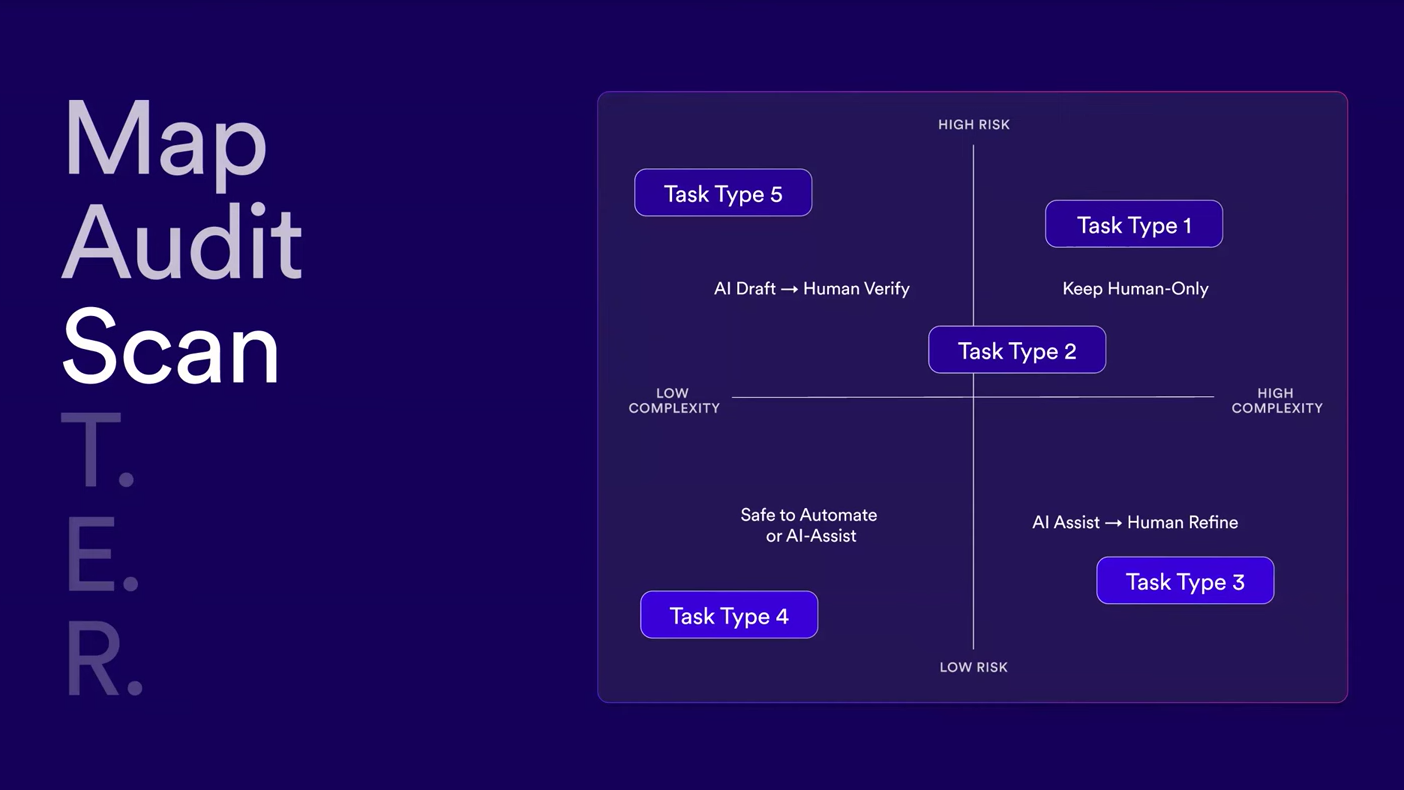
The horizontal X axis shows low to high complexity. How much knowledge, nuance, or creativity does this task require? The Y axis shows low to high automation risk.
If AI gets it wrong, meaning if it hallucinates or errors…
These tasks are safe to automate for the most part. They are repetitive, low stake tasks where AI can run unsupervised in a way.
Examples:
There's not a lot of risk if AI makes an error.
These tasks are easy for AI to generate, but a mistake could cause serious downstream consequences if it slips through unreviewed. This is where a lot of people's paranoia comes from. This quadrant needs a human safety check.
Examples:
These tasks require human creativity, pattern recognition, or judgment. But AI can still help accelerate the messy first draft. Think of this quadrant as, “AI helps me start fast, but I'm the one who adds value.”
Example:
Consider thematic clustering of qualitative data. AI proposes themes. You merge, reframe, or discard its suggestions, generating How Might We questions or statements. AI suggests them. You refine the language and scope. There's a collaboration happening, but it's not full automation.
Example:
These are the tasks that (at least for now) need the human touch.
Examples:
Even now, presenting and moderating interviews are changing now with tools like HeyGen, Synthesia, and OutsetAI. That said, this task-level AI governance grid brings clarity on where to safely experiment with AI, where to co-create with it, and where the human touch is still needed. This is your framework for understanding what to automate and what to keep human.
This is the fun part, where we move from theory into practice. It's not about designing the perfect AI system or the perfect AI workflow upfront. It's about running small, low risk experiments and seeing what works.
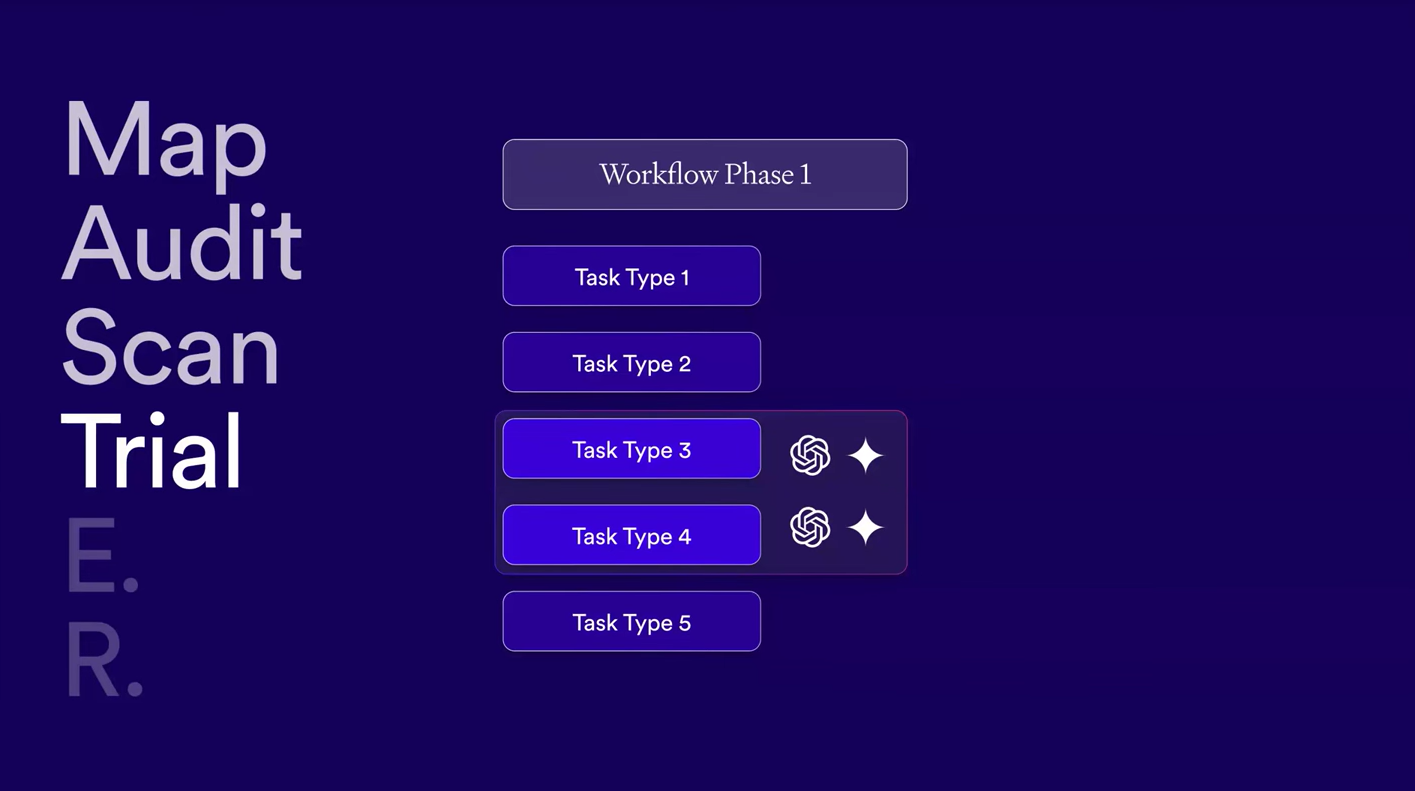
Start with one or two tasks in that low-risk, low-complexity zone.
For example:
Try it on a real project with real deliverables, then observe what happens. We're all required to become AI experimenters in a way.
During these experimental trials, ask yourself a set of questions that will guide you:
These are core questions you have to keep top of mind when you're experimenting. You don't need to overhaul your entire workflow overnight. Just treat each tool like experimental play.
Some tools you will embed as must-have tools. Others you'll table and leave behind. That's the point. We're experimenting, we're playing, we're innovating new ways of working, and that's incredibly exciting.
Now it's time to embed these tools. This is the moment where your AI experiments start becoming a part of your default. This phase is about transforming experiments into infrastructure, workflow, and infrastructure. You're not just using a tool anymore, you’re building a scalable, AI-powered workflow.
This is not a one-and-done process. Everyone will be required to become lifelong learners.
Something I'm currently trialing is blocking time each quarter or at the end of a major project for what I call an “AI tooling retrospective”. That's your moment to remap any new phases you've added to your workflow.
If you're expanding your skillset into other domains, re-audit. The tasks you may have overlooked, you can re-scan for new AI opportunities. For new tools or features that have emerged, and re-trial the ones that you've tabled, or try out new tools as well.
As your role expands outside of your traditional specialist scope, this framework ensures you're always working with the most up-to-date, optimized AI stack.
The MASTER workflow mapping exercise lays the foundation for the next stage of AI tooling, incorporating AI agents. Once you've done enough cycles of MASTER, you'll start to see clearly which tasks can be handed off-not just to LLMs or AI tools, but to AI agents that can run full sequences on your behalf.
Repeat isn't just about refinement, it's your launchpad into AI agentic workflow orchestration and also moving from a specialist role into a generalist role.
This map below is designed for you, whether you're a researcher, a designer, PM, or anyone re-thinking how your workflow could benefit from AI. Consider it your North Star as you start applying the MASTER framework to your own practice.
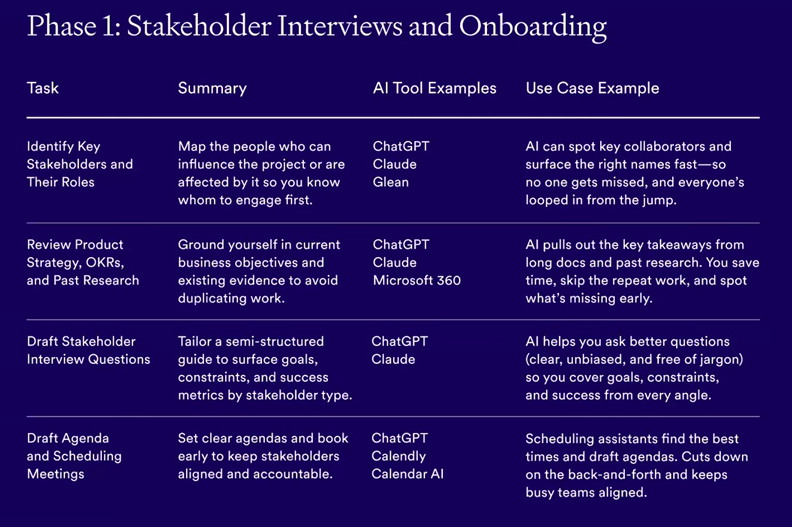
What's more important is how all of this fits into the bigger picture. There is a lot of fear and base messaging about how AI will take our jobs. I think that narrative is too narrow and, quite bluntly, wrong. The narrative that AI will take our jobs is very disconnected from how AI is actually showing up in our day-to-day work.
What we're witnessing is a redefinition of our roles as knowledge workers. Yes, some tasks are being automated, but what's emerging is a new kind of UX practitioner. Someone who's not just executing studies, but eventually orchestrating systems of AI agents on their behalf. A practitioner who knows how to combine tools, prompts, and strategy to unlock new ways of working. That’s where the discipline is headed.
I’m genuinely excited and grateful to be part of this moment and to help shape where our discipline goes next. As AI reshapes our field, we’re witnessing the return of the generalist.

.jpg)
.jpg)